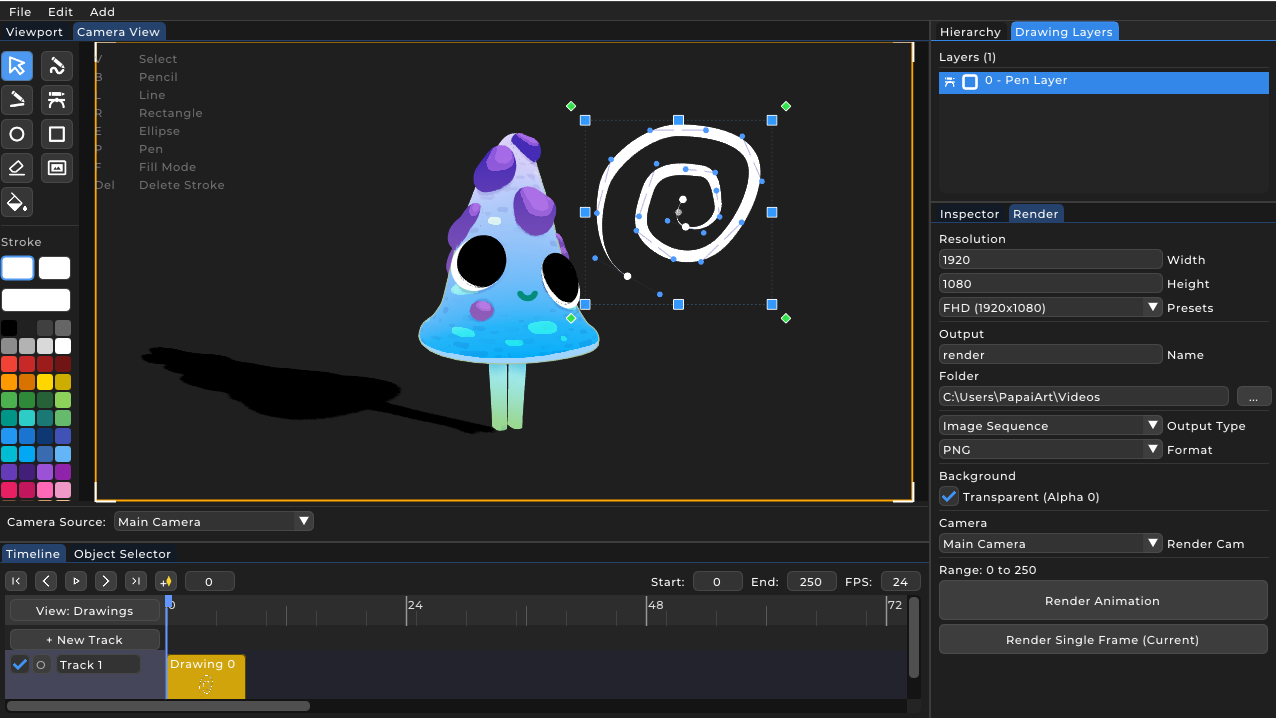
The 2D animation workflow in PapaiArt Animation Studio
The 2D animation system in PapaiArt Animation Studio combines classical frame-by-frame animation with modern vector graphics. The underlying engine runs entirely in 3D space, but the drawn elements keep the organic, hand-drawn look of traditional 2D cartoons.
1. Timeline and drawing tracks
The workflow starts on the timeline. You create DrawingTracks, which act as global animation layers. These tracks hold 2D drawing clips (Drawing2D) that span a given number of frames. This makes it easy to adjust timing and exposure using standard "exposure sheet" logic, without redrawing static elements.
2. Vector drawing tools, images and brushes
When you draw, the software generates vector paths (Stroke2D). Because the system is vector-based rather than raster-based, strokes can be edited and scaled at any time without quality loss. The toolset includes:
- Pencil: Freehand drawing paths in 3D space.
- Pen: Bezier-curve based vector editing.
- Shapes: Lines, rectangles and ellipses.
- Image insertion: External image files can be loaded as strokes (StrokeType::Image). The 2D textures can be reshaped through their corner points so they sit naturally in the scene.
Brush behaviour is configured through the BrushParams system. From Calligraphy (angle-sensitive thickness) to the Rough engine (procedural wobble to mimic hand-drawn lines), it covers a wide range of 2D styles.
3. Polygon fill system and flat design
Colouring is more flexible than basic flood-fill. Any closed vector shape can use the Fill function. Because strokes form polygons internally, the fill colour and the outline are independent. You can set different opacities for stroke and fill, or disable the outline entirely (BrushStyle::None) to build clean, shape-driven "flat design" animations.
4. Layer management (Drawing Layers panel)
While the main Timeline handles overall animation logic, the Drawing Layers panel manages content within a single drawing clip. Each stroke, shape or inserted image behaves as a local layer. You can drag and drop these elements to change their draw order, duplicate or delete them. This is useful when building dense, overlapping 2.5D illustrations.
5. Onion skinning
Spacing and timing are the core of classical 2D animation. The built-in Onion Skinning draws the previous and following frames on the canvas with adjustable semi-transparent tints. It is the standard visual reference for working out frame-by-frame motion.