 Level Editor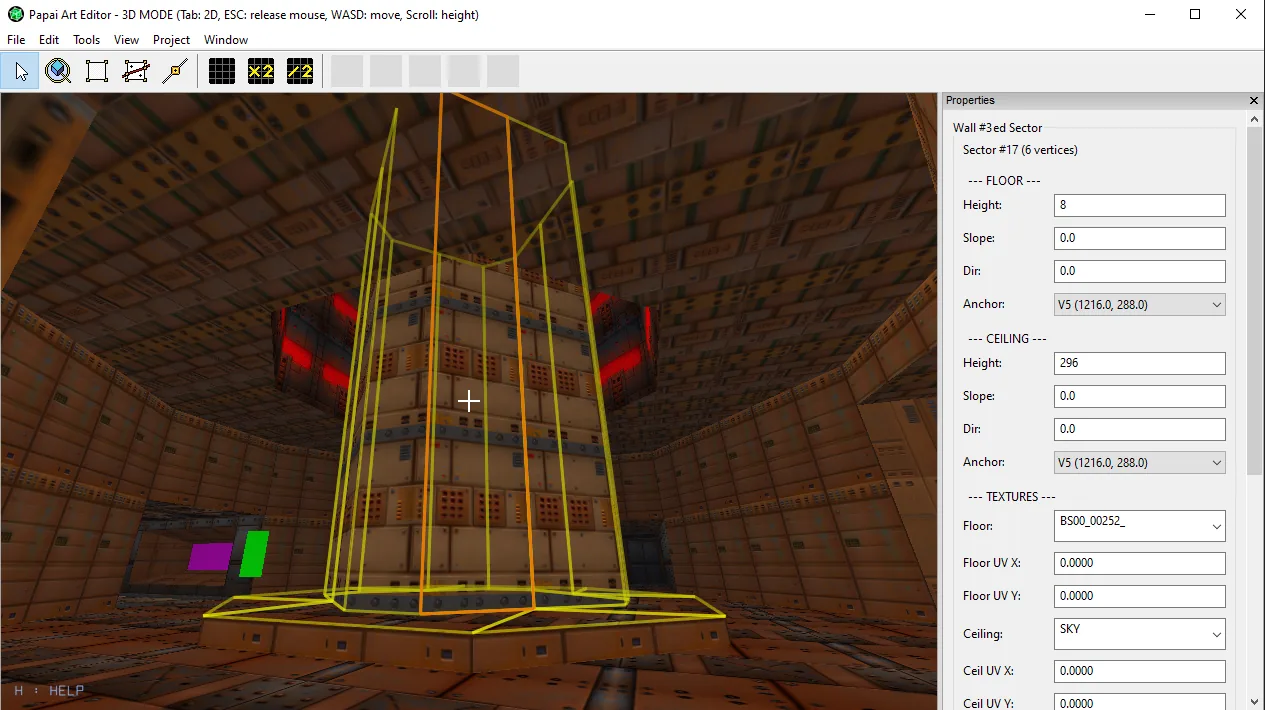
Multi-Select Texturing in 3D Mode
Texturing just got a lot faster. Until now, applying a texture in the 3D view meant clicking one surface, picking a texture, then hunting down the next surface — one at a time. This update introduces multi-face selection.
Shift+Click to select multiple surfaces
While walking around in the 3D view, hold Shift and click any floor, ceiling or wall to add it to your selection. Shift+Click a selected face again to remove it.
The mouse stays captured during the sweep, so you can keep walking and picking surfaces in one continuous flow — press ESC (or plain click) when you're done.
Every selected face is highlighted with a yellow outline, so you always see exactly what you're about to paint. Walls now get a proper selection highlight too, which they were missing before.
Apply a texture to everything at once
Once you have your selection:
- The quick-apply texture buttons on the toolbar now paint all selected faces in one click — floors, ceilings and walls each receive the texture in their own slot.
- The sidebar texture dropdowns fan out as well: the Floor combo retextures every selected floor, Ceiling every selected ceiling, and Wall every selected wall.
The whole batch is a single undo step, so one Ctrl+Z takes you right back.
Small change, big time saver — especially on large maps where a corridor's worth of walls used to mean a dozen round trips. Enjoy!