 Level Editor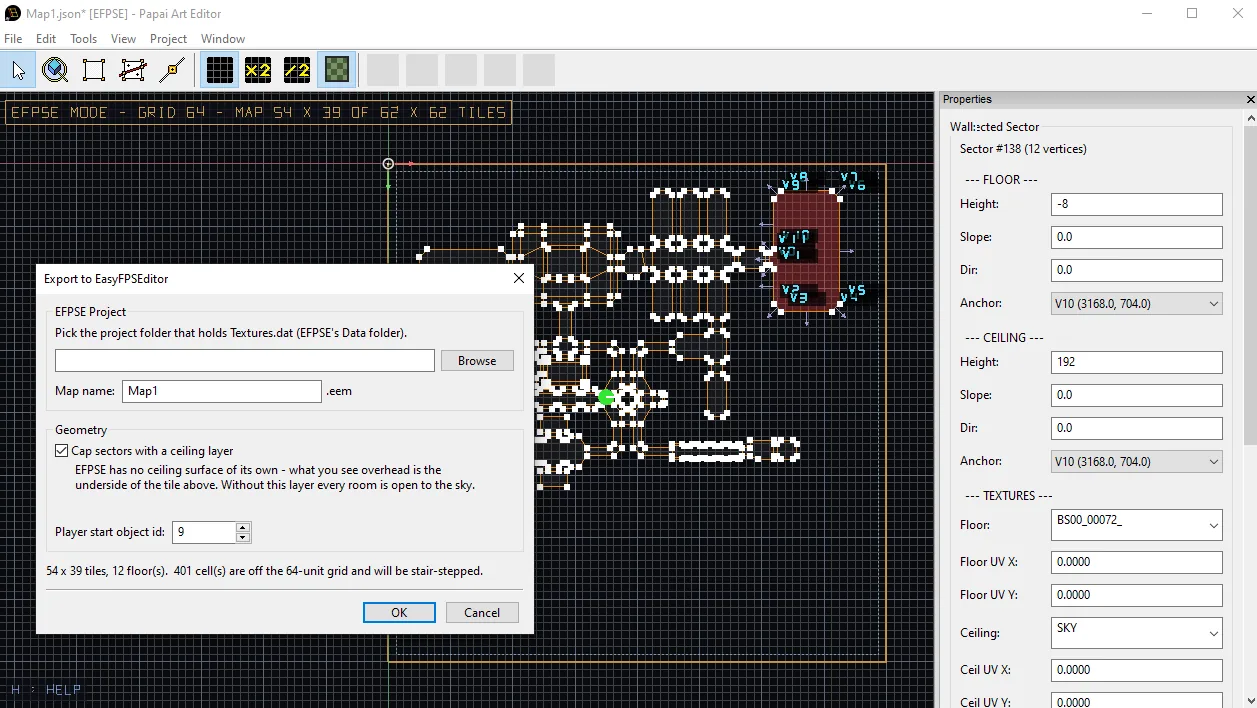
Exporting to EasyFPSEditor, and drawing for it
The problem with exporting to a tile engine
Level Editor draws maps the way a portal engine wants them: sectors with arbitrary polygonal outlines, per-wall textures, sloped floors, heights anywhere you like. EasyFPSEditor wants something else entirely. An EFPSE map is a 3D grid of 64-unit cubes, and every cell is one of three things: empty, a solid cube, or a walkable floor quad. There is no diagonal, no half tile, no floor height between two levels.
So an export is not a file conversion — it is a rasterisation. And the honest part of the job is not the writing, it is telling the author what the rasterisation cost them.
The format
.eem has no magic bytes and no compression. It is a v2 header followed by five int16 planes over the grid, plane-major then y-major:
int16 version, floorCount, width, height int16 plane[5][floorCount][height][width]
Plane 0 holds tiles, and the value is a Textures.dat id plus one, so 0 can mean empty. What decides whether a cell is a wall cube or a walkable floor is not the plane — it is the type column of the texture row in Textures.dat: type 2 is a wall, type 3 is a floor. Plane 4 holds modifiers; planes 1–3 hold objects, entities and models.
Those three id tables are not documented anywhere, and I refuse to guess into a user's project. So the exporter writes only what it can justify: the player start (object id 9, which is what a freshly authored EFPSE map puts on its player cell), plus any Thing whose type string carries an explicit id — EFPSE_OBJ_56, EFPSE_ENT_…, EFPSE_MDL_…, EFPSE_MOD_…. That prefix is the escape hatch: anything the community identifies later is usable immediately, with no new build, and it is what a future .eem importer would round-trip through.
One happy accident: an EFPSE tile is 64 units on a side, which is exactly this toolchain's metre. Nothing is rescaled on the way out.
What the rasteriser does
Each cell is classified from its centre point: which sector contains it, and what the floor and ceiling heights are there — sampling the slope plane per cell is what turns a smooth LE ramp into an EFPSE stepped ramp, and nothing else in the pipeline has to know slopes exist. A cell whose ceiling is at or below its floor isn't a room, it's a pillar, so it stays solid.
Then three things get built that a hand-made EFPSE map also has:
- Supports. An EFPSE floor quad has no sides. A raised sector would show a gap at the step, so every cell below a raised floor is filled with wall cubes.
- A roof layer (optional, on by default). EFPSE has no ceiling surface of its own — what you see overhead is the underside of the cube above. Without that layer, every room is open to the skybox.
- An enclosure ring. Every empty cell touching walkable space — diagonally too, so corners have no pinhole — becomes a solid column up to the tallest ceiling next to it. Its texture comes from the nearest wall edge of the straight neighbour, because that shared face is the wall the player actually looks at.
Two limits get handled instead of silently breaking things. Negative floor heights are legal in the editor and don't exist in EFPSE, so the whole map slides up rather than losing its basement (and the report says by how many tiles). And the grid is a fixed 64×64 with the outer ring spent on the closing wall, so the map is centred in it — which both guarantees the wall margin and leaves 62×62 cells for actual geometry. Over that, the export fails with a real number in the message rather than writing a truncated level.
The report is the feature
Every export comes back with a count of partial cells: cells where the centre and the four inset corners disagree about which sector they're in. That is exactly the set of cells where the map is off the 64 grid, and exactly the geometry that came out stair-stepped. Zero partial cells means the conversion was exact.
The dialog runs the same rasteriser as a dry run before anything is written, so the two things worth knowing up front — does it fit, and how much stair-stepping is coming — are on screen while you can still cancel: "22 x 18 tiles, 4 floor(s). Fully on the 64-unit grid: the geometry converts exactly."
Not breaking someone's project
The export target is a whole EFPSE project folder — the one holding Textures.dat — because an .eem means nothing without the Textures.dat that numbers its tiles and the Maps.dat that lists it. Writing into a project someone has been building for months calls for some paranoia:
- Existing texture ids are never renumbered. Every other map in the project refers to them by id; a renumber would silently repaint the whole game. New rows are appended, and they inherit the trailing columns from whatever the project already writes.
- Texture files get copied in next to their row, because EFPSE treats a missing texture as a hard load error, not a placeholder. Names are sanitised — a space in a file name splits a space-separated
.datrow and the engine loads the wrong file. - An existing
Maps.datblock is left completely alone. It holds music, fog, light radii and door sounds this exporter has no business inventing. A new map's 34-line block is cloned from an existing one so it inherits the project's conventions, with script references reset toNone— those belong to the other map. - Every write is atomic: temp file, verify the byte count landed, move the previous file aside as
.bak, then take its place. A half-writtenTextures.datwould break the project, not just this map.
The mode: stop losing geometry at export time
The exporter knows all the rules above. The problem is that it learns them too late. By the time you export, the wall you placed at x=31 has already become a staircase and the floor you set to 100 has already been rounded away.
So the rules moved into the editor as EFPSE Editing Mode (View menu, sticky per user like a chosen grid size):
- The 2D grid locks to 64 units and every placed point snaps to it. Alt (free placement) and hiding the grid both stop being bypasses — in this mode the lattice is a constraint, not an aid.
- Floor and ceiling push-pull moves by exactly one cube (Ctrl+wheel in the 3D view; the badge says so, because which of the two you're doing is otherwise invisible until export). The nudge is deliberately not plain ±64: from an off-lattice value it lands on the lattice boundary in the direction of travel, so one nudge per surface makes a pre-mode map exact instead of carrying its rounding error up the level.
- The viewport draws the 64×64 cell map area as a guide, with 8-cell blocks emphasised — an EFPSE level is planned by counting cubes. The fine cell lines fade out when you zoom out far enough that they'd turn into mush, so a whole map stays readable at once.
- A mode badge reads
EFPSE MODE - GRID 64 - MAP 22 X 18 OF 62 X 62 TILES, and turns into a redTOO LARGE TO EXPORTthe moment the map outgrows the grid — because in the exporter that's a hard error, not a warning.
It is an editing constraint, not a file format. A map authored in this mode is an ordinary map, and turning the mode off leaves it untouched.