 Level Modeller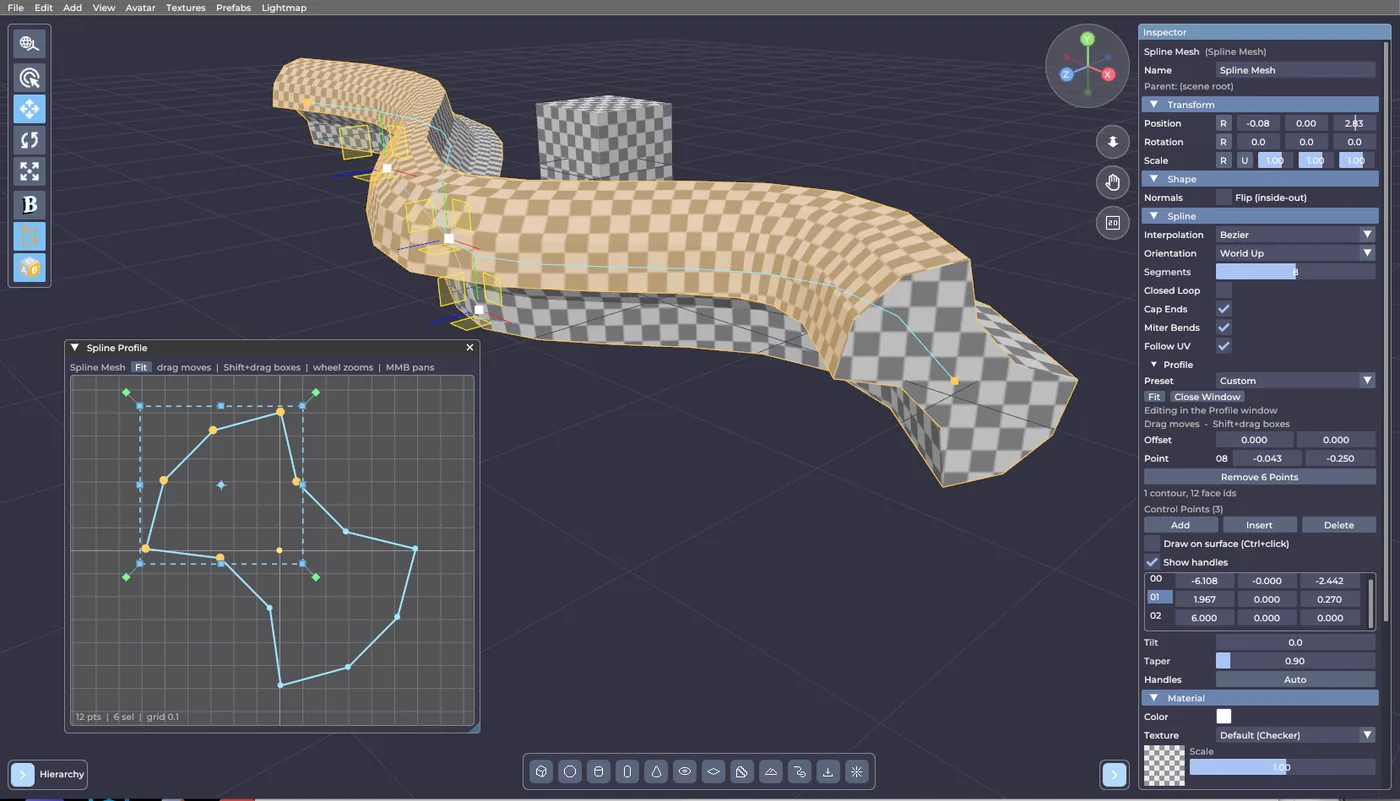
The Spline Profile editor grew up
The newest build is mostly about one thing: the profile editor on Spline Mesh objects was too cramped to actually shape anything in. You can now navigate it, select properly, and transform whole groups of points at once. On the way there the whole editor got a density pass, because the Inspector was clipping its own labels.
THE SPLINE PROFILE EDITOR
You can move around in it now. The wheel zooms at the cursor, not at the middle of the box, so whatever you were looking at stays where you put it. Middle-drag pans (Alt+drag does the same if your mouse has no middle button). Home, or the Fit button, frames the section again. The view no longer snaps back to a fit every time the shape changes; it stays where you left it until you ask for a fit.
Real multi-selection. Click a point to select it, Shift+click to add or remove one, drag empty space to rubber-band a rectangle. If your shape is thin and there is no empty space to start from, Shift+drag boxes from anywhere and adds to what is already selected.
A transform box. Select two or more points and you get a bounding box with eight scale handles, four rotate handles just outside the corners, and a centre to move from. The box edge moves too, which matters on a flat selection where everything sits on top of everything. Hold Shift for uniform scaling or 15 degree rotation steps, Ctrl to snap to the grid. Dragging any selected point moves the whole selection.
Adding points is no longer a guessing game. Hover the outline and a small "+" ghost shows exactly where a new point would land. Press there and it is inserted on the edge, so inserting alone never deforms the section - the drag that follows does. Away from that ghost, a press is always a rectangle select.
Press versus drag. Every mouse action is now decided by whether you actually moved: a press that travels a few pixels is a drag, a press that does not is a click. No more "I meant to box-select and it added a point instead".
Room to work. The canvas has a drag grip on its bottom edge, so you can make it as tall as you like. And if the panel is still not enough, Pop Out opens the profile in a resizable window - same view, same selection, so you keep your place switching between the two.
EDITOR INTERFACE
A new UI face. The editor was using a bitmap font that could not be scaled down and had a wide letter spacing - that is why labels like "Interpolation" ran out of room and got clipped. It is now a proper vector face at the same nominal size: narrower, cleaner, and the row heights are unchanged.
Tighter spacing. Input fields, row spacing and tree indentation all came down a few pixels, so a panel reads as an ordered table instead of a stack of chunky boxes. The colours are exactly as they were.
Wider Inspector, and both side panels are resizable. The Inspector starts wider than before, and you can drag the inner edge of either the Hierarchy or the Inspector to set its width. Everything that sits next to a panel - the tool column, the primitive bar, the navigation gizmo, the collapse toggles - follows along.